
Features › Articles, batches and best-before dates
Articles, batches and best-before dates
Lean article master data ensures that the right EAN and the right weight appear on the delivery note. Batch and best-before date come from the barcode when scanning – and can later be found again across all delivery notes.
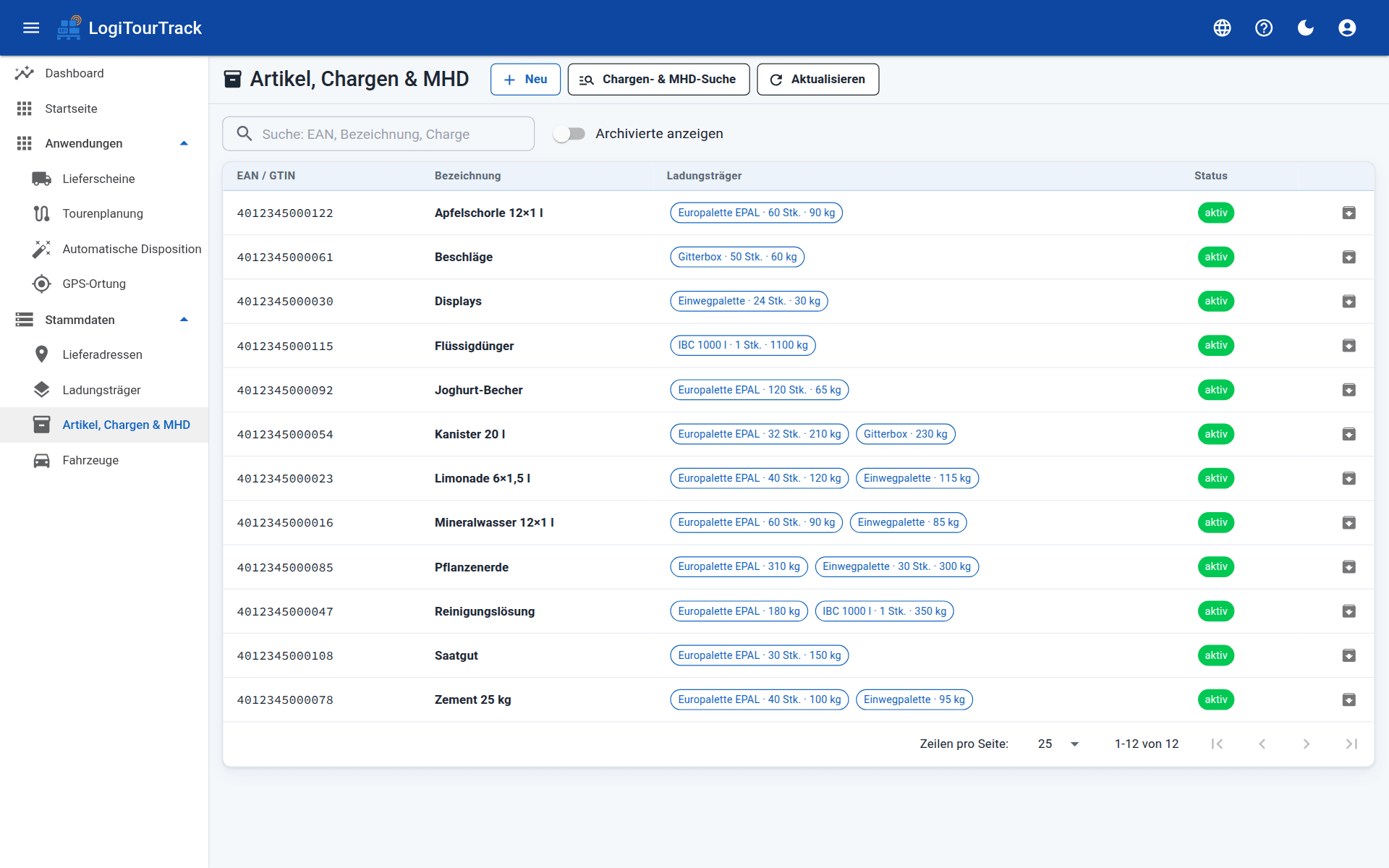
The article master data
- EAN / GTIN and description are mandatory. 8 to 14 digits are allowed (EAN-8, EAN-13, GTIN-14); the check digit is verified, and each EAN exists only once.
- Load carriers: For each article you specify which load carriers it is shipped on – with weight in kg and pieces per load carrier.
- Best-before days: shelf life in days. For new batches, best-before date = label date + days.
- Batches: list of the article’s batches with best-before date and remark.
- The search finds articles by EAN, description or batch.
- Articles that appear in delivery notes are archived instead of deleted and can be restored.
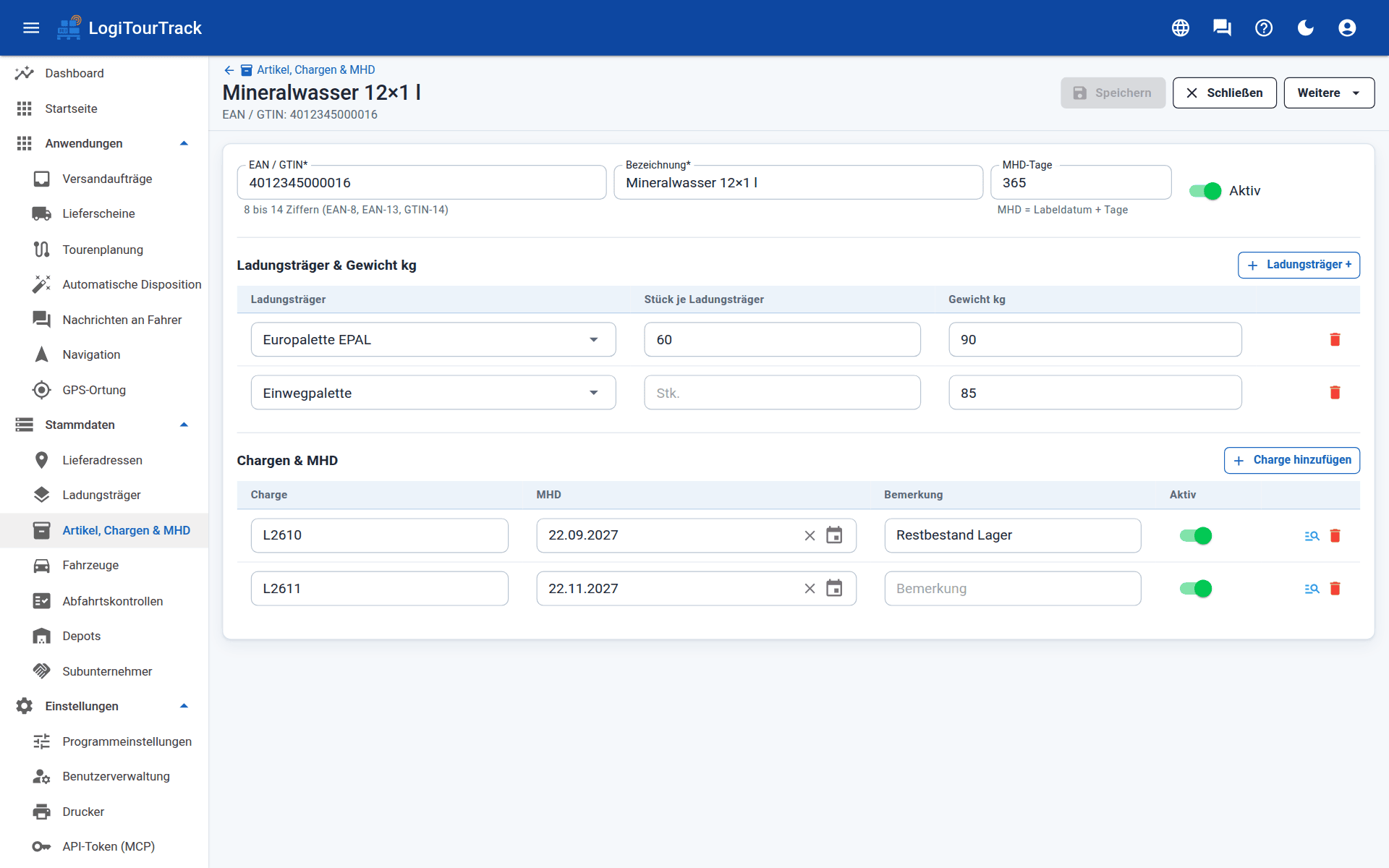
What the article master data is needed for
- Delivery note: With the article, the EAN, description and load carrier are entered in the line item; the weight results from quantity × weight per load carrier.
- Loading: The driver app compares the EAN of the scanned package with the line item and shows the driver the contents in plain text.
- Pallet labels: The number per pallet comes from ‘Pieces per load carrier’.
- Articles do not have to be created in advance: from a delivery note line item you can add a new article to the article master data with one click. Articles can also come from your ERP system via the interface.
Example: an article and its delivery note
- Article ‘Mineral water 12×1 l’ with EAN
4012345000016, 365 best-before days and the batches L2611 and L2610. - Load carrier ‘Euro pallet EPAL’: 90 kg and 60 pieces per pallet.
- In the delivery note you select the article and enter the quantity 6. Load carrier, EAN and description are filled in, and the weight is 540 kg.
- When loading, the driver app accepts only Euro pallets with this EAN for this line item – six at most.
Batch and best-before date from the GS1-128 code
If the package carries a GS1-128 barcode, one scan in the driver app fills in EAN, batch, best-before date, weight and quantity. Batch and best-before date can also be entered by hand.
Example of a code on a pallet of yoghurt pots: (01)04012345000092(15)261213(10)M2614
(01)GTIN: is taken over as EAN 4012345000092 and compared with the line item. EAN-13 and GTIN-14 are treated as identical.(15)Best-before date: 13.12.2026.(10)Batch: M2614.
NVE/SSCC (00), expiry date (17), quantity (37) and weight (310x/330x) are also evaluated. Batch and best-before date then appear on the package in the delivery note. During loading, load carrier, EAN and quantity are checked; batch and best-before date are taken over but not checked against the delivery note.
More on scanning: Loading by scan.
FEFO: the batch with the earliest best-before date first
When creating pallet labels, LogiTourTrack suggests for each pallet the active batch with the earliest best-before date that is still valid (first expired, first out). All active batches remain selectable.
- If the article has batches, the batch is mandatory on the label; if its batches have a best-before date, so is the best-before date.
- If the matching batch is missing, you create it directly in the dialog. It is added to the article master data with its best-before date; the batch number is assigned from a separate number range.
- Example: ‘Yoghurt pots’ has the batches M2614 (best before in 21 days) and M2615 (best before in 28 days) – M2614 is suggested.
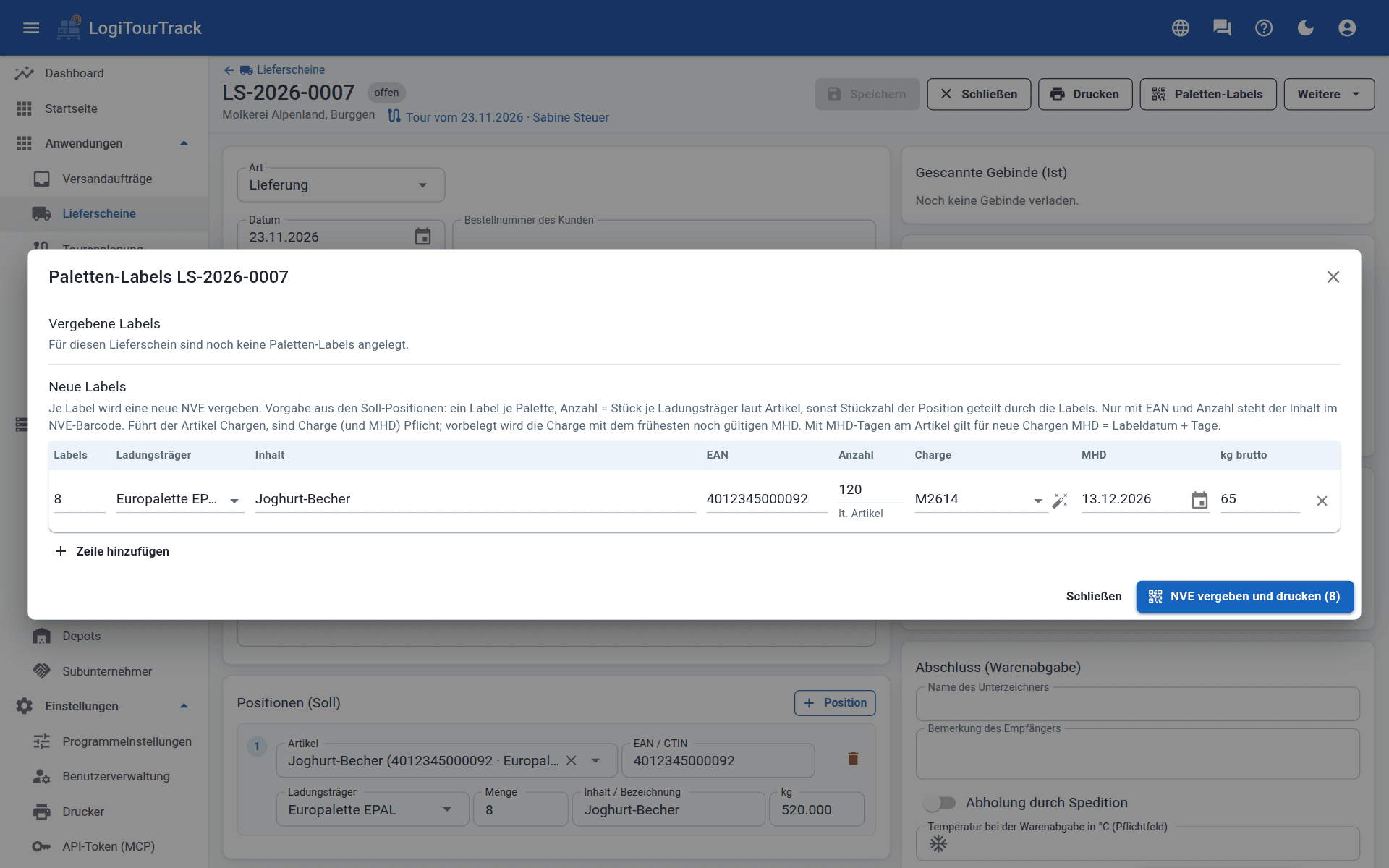
More on the labels: Documents and labels.
Batch and best-before search: traceability across all delivery notes
The search finds all delivery notes on which a batch, a best-before date or an EAN/GTIN occurs in the line items or in the scanned packages.
- Search criteria: batch, EAN or article description, best-before date from/to.
- For each hit the result shows delivery note, date, delivery address, status, origin (line item or package), quantity and weight.
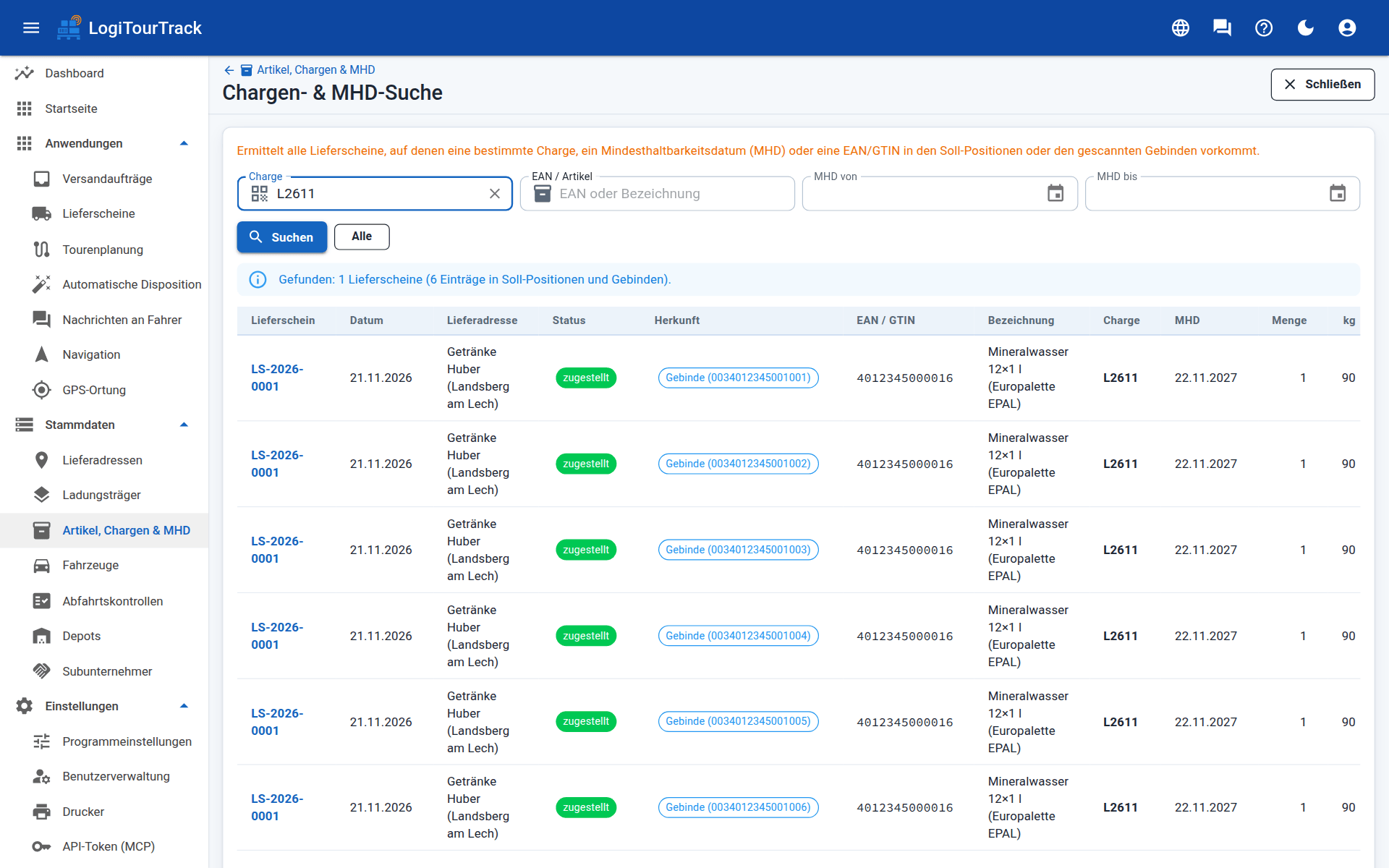
Example: where did batch L2611 go?
- A supplier reports a problem with batch L2611 of ‘Mineral water 12×1 l’.
- Under ‘Items, Batches & Best-before’ you open the ‘Batch & Best-before Search’, enter L2611 and click ‘Search’.
- The list of hits shows the delivery note to ‘Getränke Huber’ with six scanned Euro pallets of this batch, status ‘delivered’.
- A click on the hit opens the delivery note with recipient, signature and all packages.
Load carriers as master data
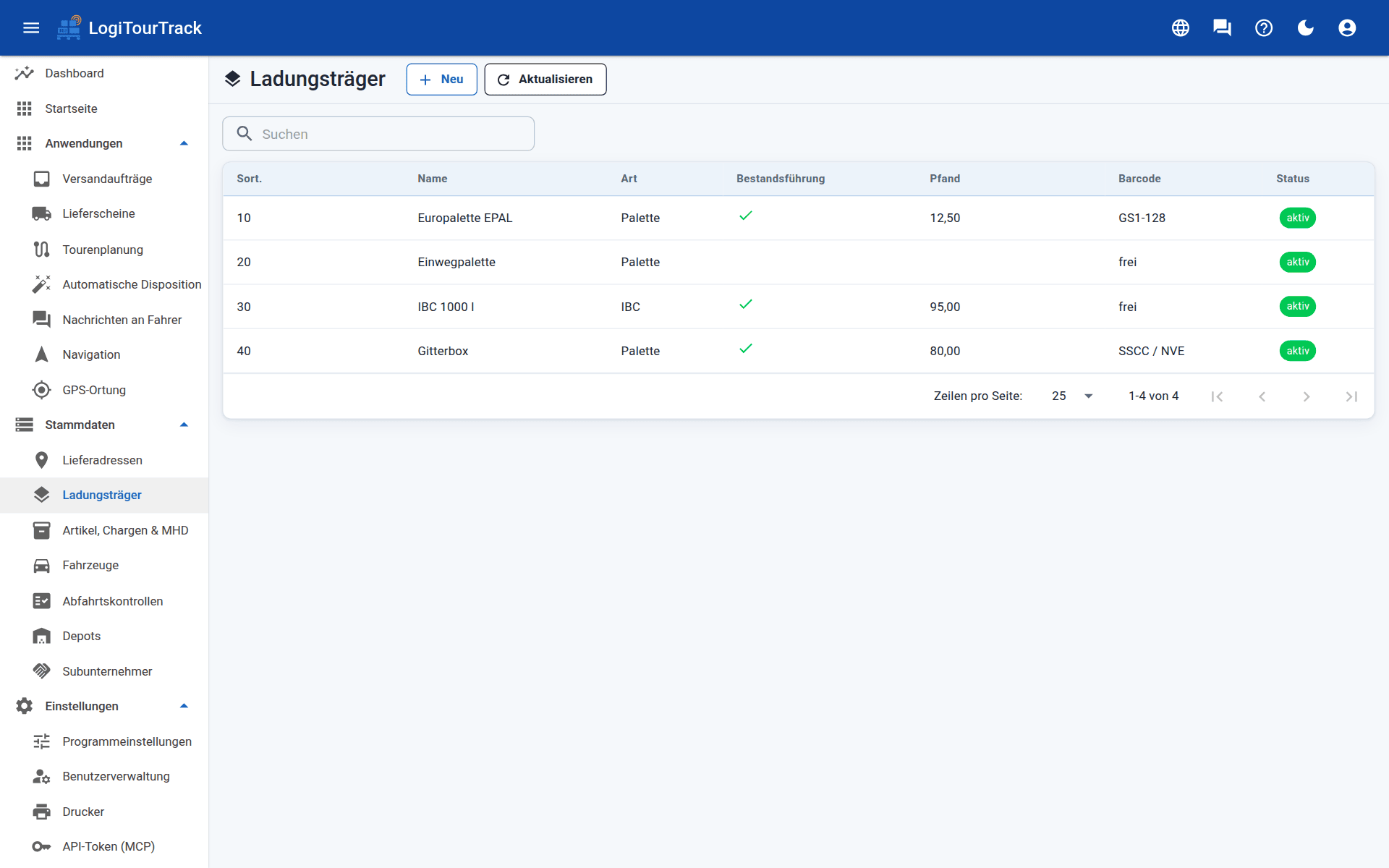
Euro pallet, one-way pallet, IBC, pallet cage: you define yourself which load carriers exist. LogiTourTrack creates the usual types (Euro pallet, one-way pallet, IBC 1000 l) at the push of a button.
- Type: pallet or IBC. For IBCs the driver app additionally asks for the 6-digit IBC number.
- Barcode rule: free (barcode is taken over unchanged), SSCC/NVE (18 digits) or GS1-128 (GTIN, batch, best-before date, quantity, weight).
- Stock tracking and deposit per item for the load carrier exchange – see Delivery notes.
- Sort order for the selection lists, packaging code for the electronic delivery note and a switch for deactivating.
Try it out
Free for 30 days, with your own address and, if you wish, with sample data.