
The digital delivery note for mid-sized businesses
With pallets, IBCs, batches and best-before dates. Loading by scan, checked against the delivery note, hand-over with signature on the smartphone – plus route planning with automatic dispatch and GPS tracking.
- Your own address yourcompany.logitourtrack.de
- No installation
- Cancel monthly
From delivery note to signature
Everything delivery and logistics businesses need every day – in the browser for dispatch, as an app for the drivers.
9 building blocks, one workflow Point at a circle or tap it.
-
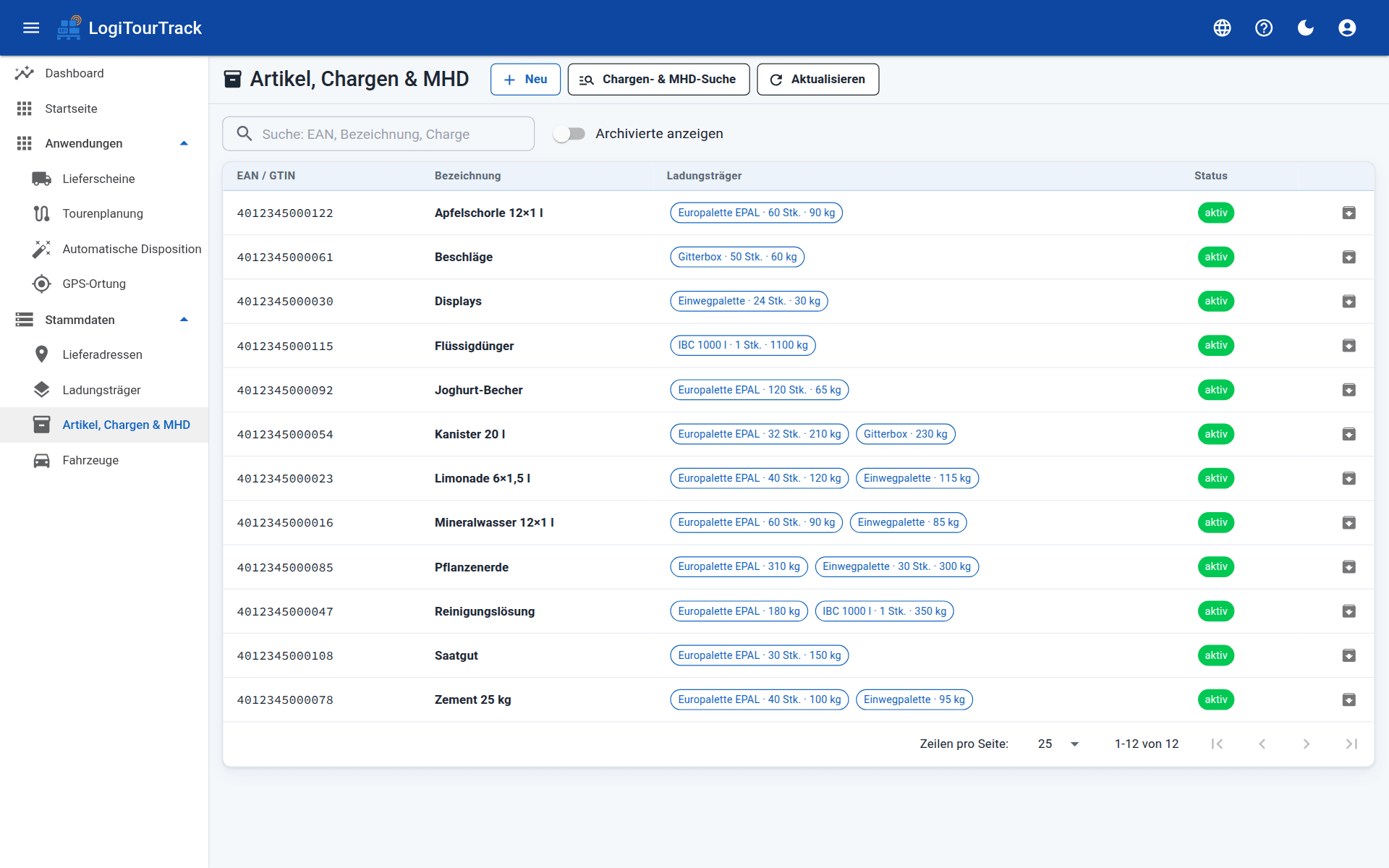
Delivery notes
- Line items with article, EAN, pallets, IBCs and other packages
- Status from open through loaded to delivered
- Shipping orders with partial and consolidated deliveries
-
Articles, batches and best-before dates
- Article master data with EAN/GTIN, weight and pieces per load carrier
- Batch and best-before date taken from the GS1-128 code
- Pallet labels suggest the batch with the earliest best-before date (FEFO)
-
Loading by scan
- Scan packages during loading – with handheld, hand-held scanner or camera
- Only what is on the delivery note gets loaded: load carrier, EAN and quantity
- Also works without a network connection and sends later
-
Documents and labels
- Delivery note as PDF – with your logo or letterhead, in the language of the delivery address
- Electronic delivery note via EDI (EANCOM DESADV), by email or for retrieval
- A6 pallet labels with SSCC as GS1-128 barcode
-
Route planning and dispatch
- Plan tours with map, road route and calculated arrival times
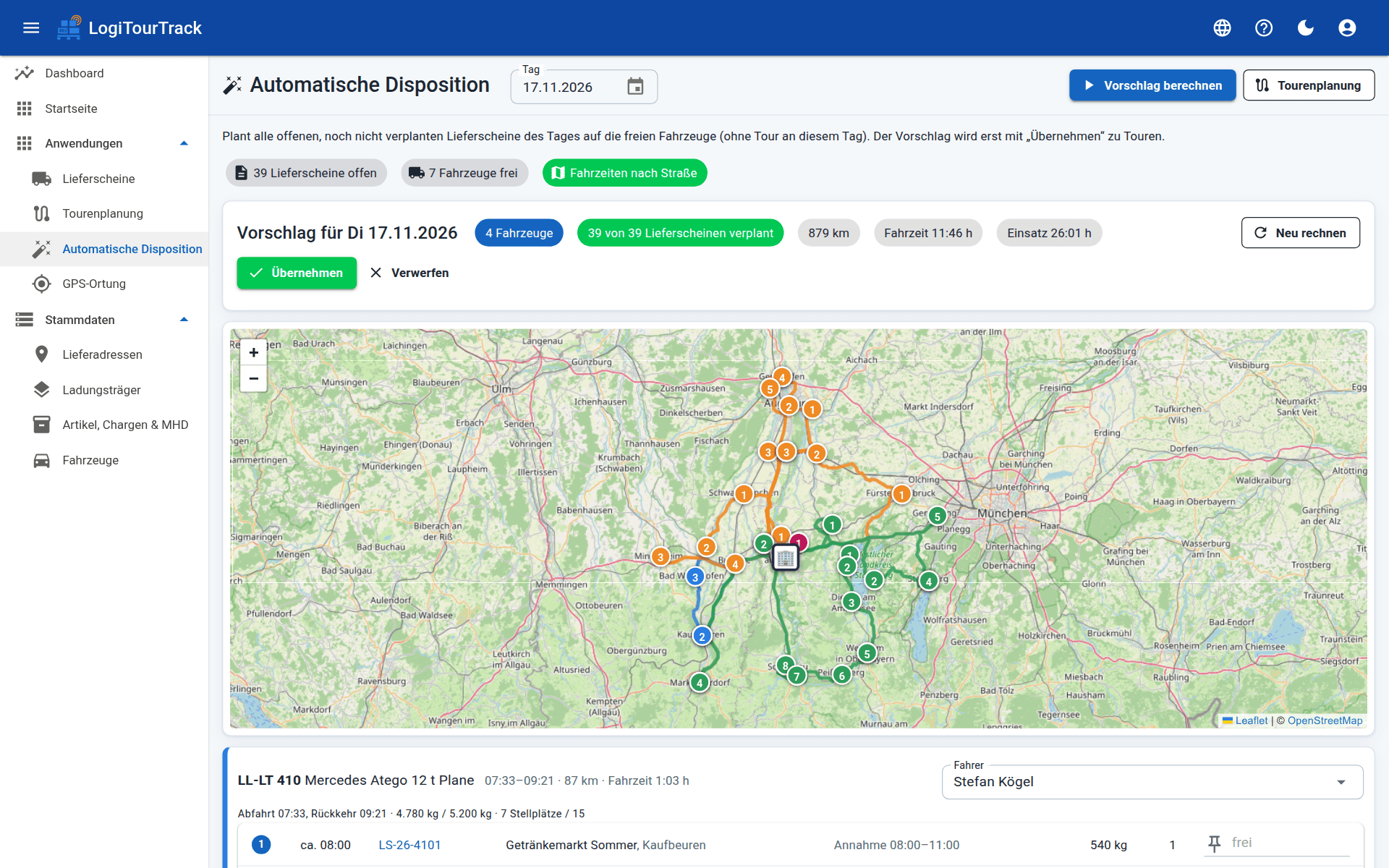
- Automatic dispatch: assigns a day's delivery notes to the vehicles with one click *
- Takes payload, pallet spaces, equipment, receiving times and driving breaks into account *
-
GPS tracking and truck navigation
- Vehicles live on the map, history by day and logbook as PDF
- Truck route with the vehicle’s height and weight, restrictions along the route
- Guidance in the driver app with voice prompts and speed limit
-
Goods delivery at the customer’s site
- Signature and name of the recipient on the smartphone
- Proof of delivery with photos, discrepancies, cash on delivery and temperature
- The delivery note shows as delivered in the office straight away
-
Integration and permissions
- REST interface (API) to your ERP system: transfer delivery notes, fetch feedback
- Webhooks report events to your system
- MCP interface for AI assistants: analyses and queries in conversation
-
Languages and help
- Interface and documents in six languages: German, English, French, Polish, Italian, Ukrainian
- Getting-started help in the web application and the driver app
- AI help answers questions about operation
* Add-on module ‘Automatic dispatch’: added to the subscription in the customer account, 4,00 € per vehicle per month (net). It is included in the demo version.
LogiTourTrack in one minute
From the delivery note via the tour to the signature at the customer’s site.
What LogiTourTrack looks like
Screenshots of the application with sample data.
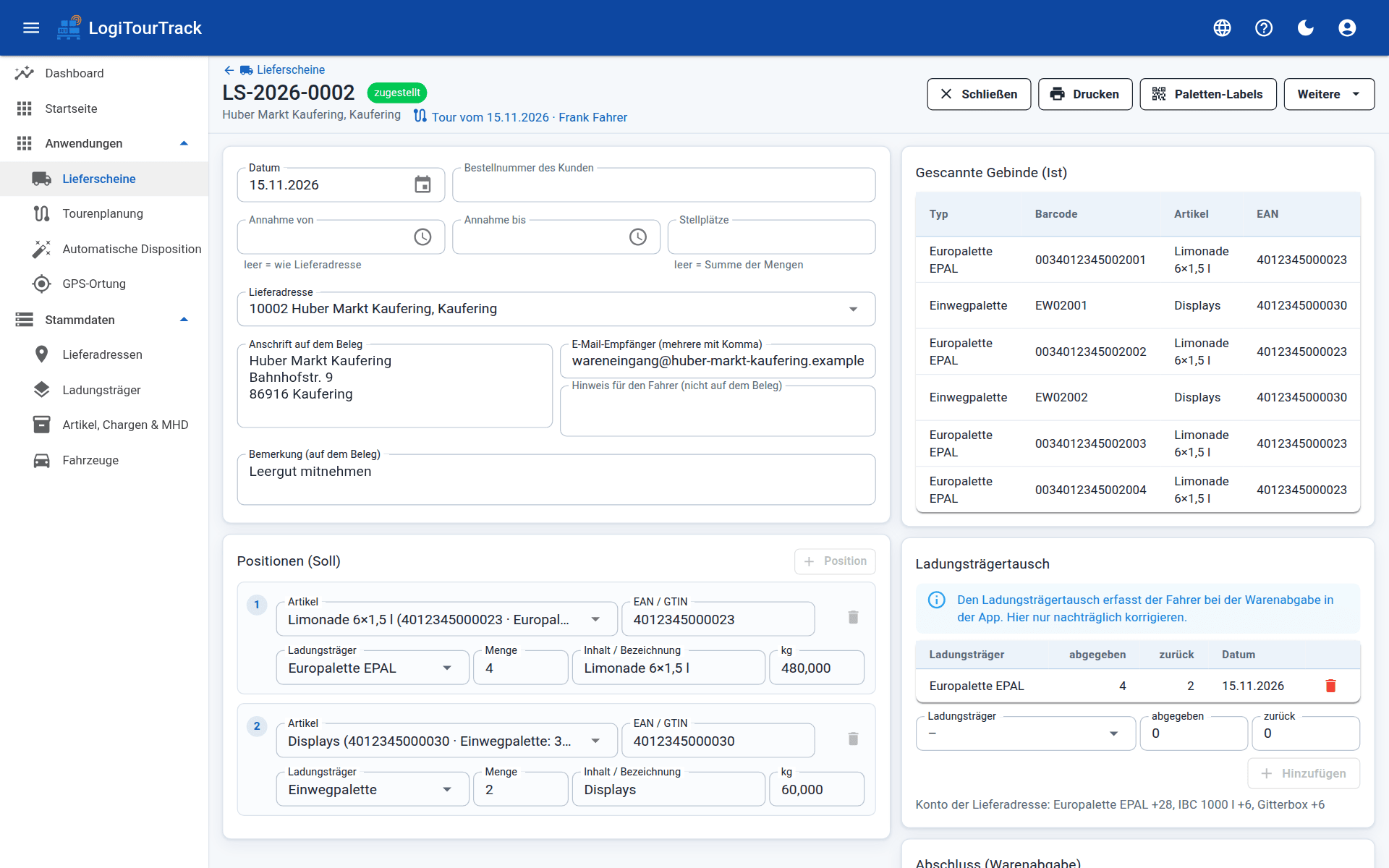
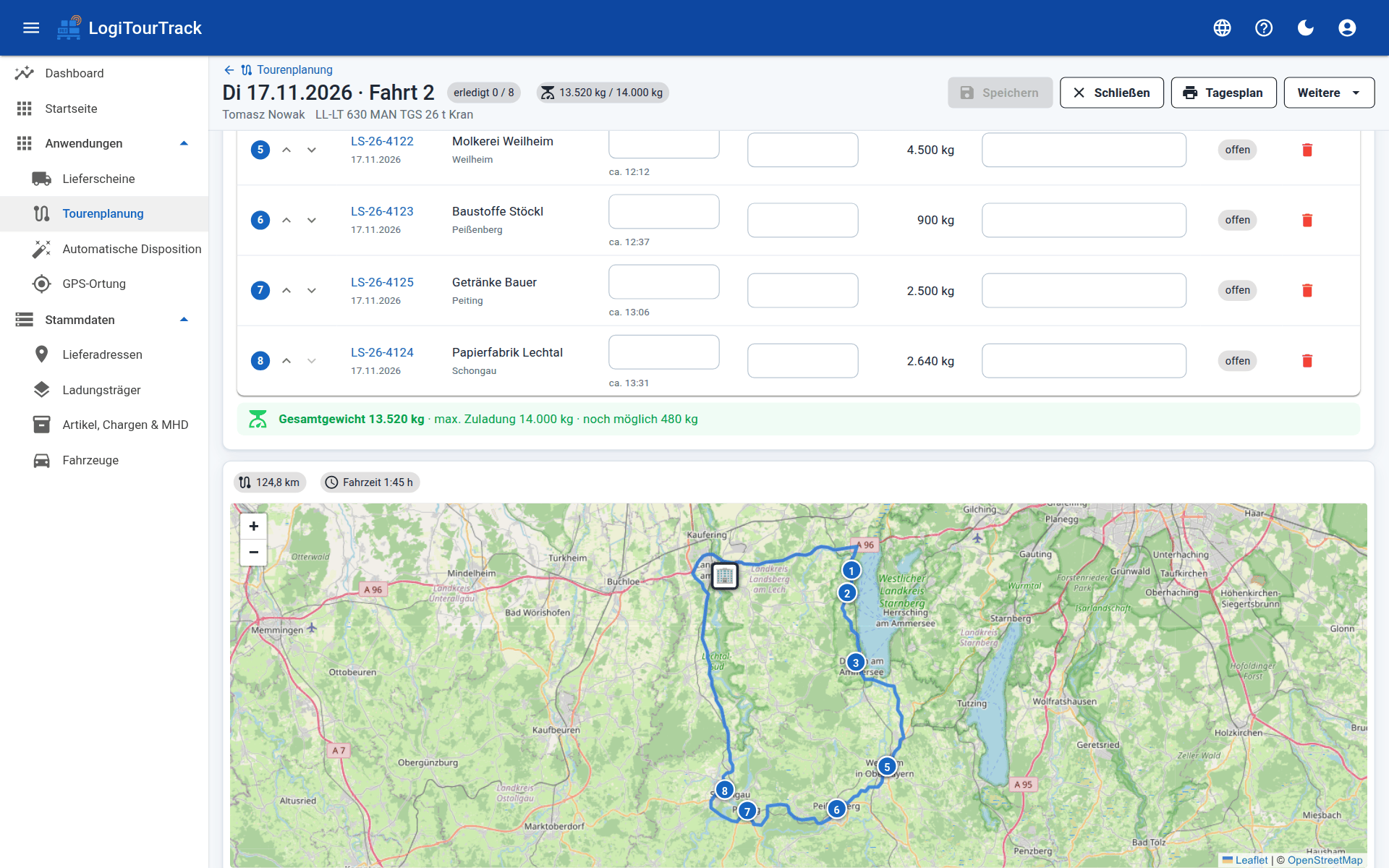
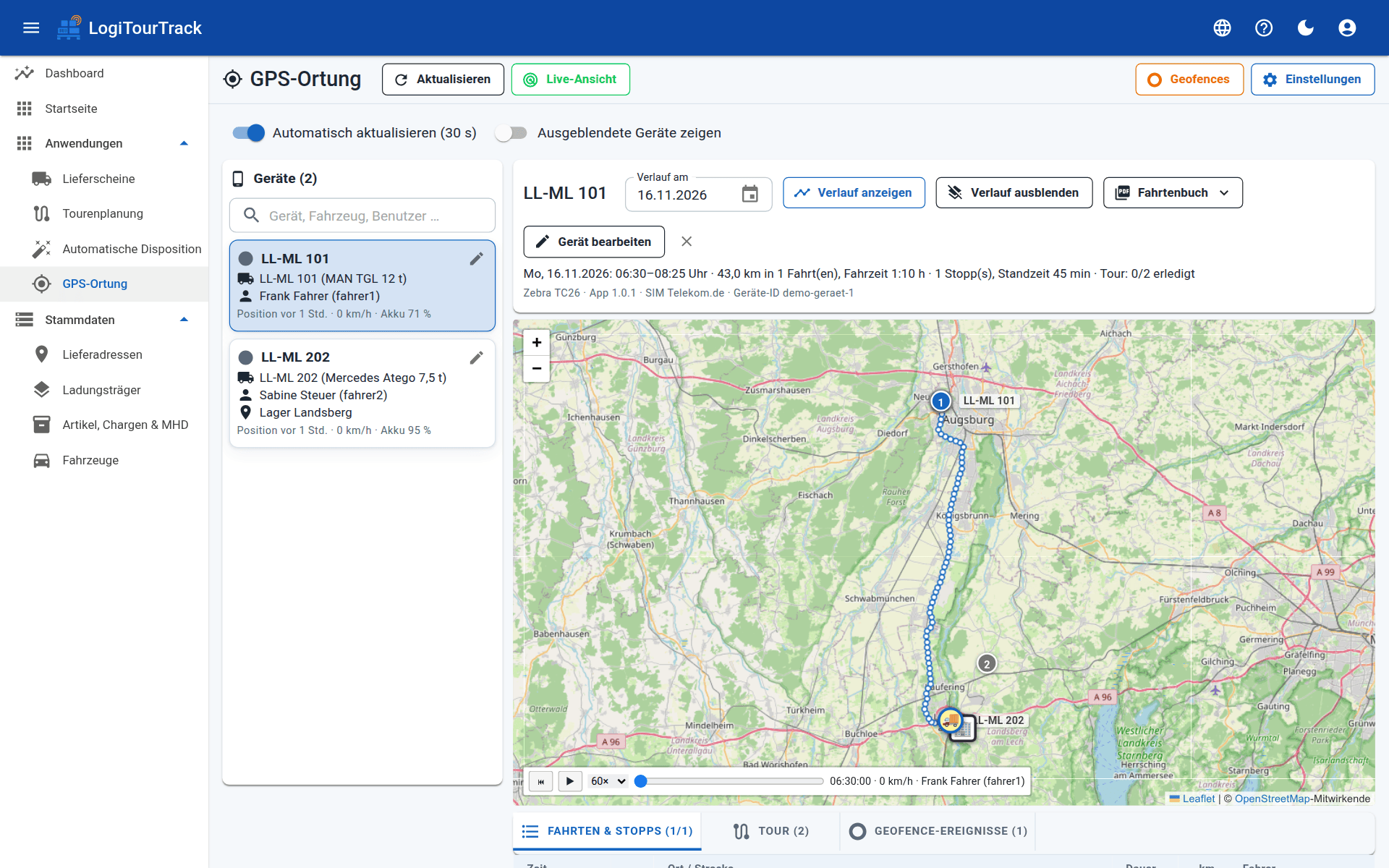
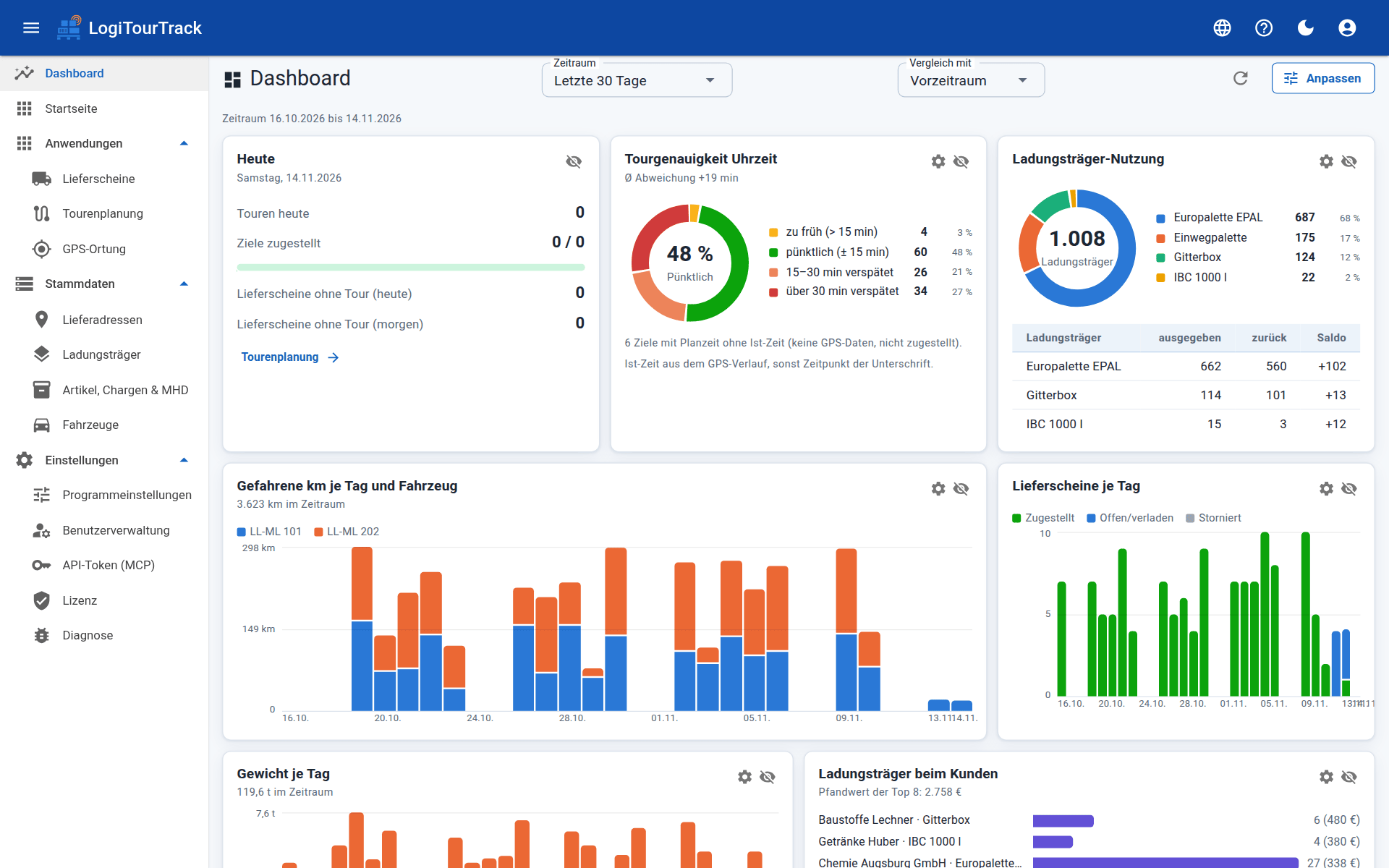
Everything at a glance: the dashboard
Key figures from delivery notes, tours and GPS history on one page – shown to dispatch right after logging in.
- Today: tours, delivered stops and delivery notes without a tour
- Trends: delivery notes, weight and kilometres driven per day, week or month
- Tour plan vs. GPS: punctuality, delays, changed order and stops not visited
- Rankings: items, destinations, drivers and vehicles
- Load carriers held by customers with deposit value, exchanges issued and returned
- Any period you like, compared with the previous period or the previous year
- Each user arranges their own tiles: selection, order, width and filters by vehicle, driver or delivery address
- One click takes you on to the delivery note list, the tour or the map
The driver app for Android and iPhone
Your drivers work with their smartphone: view the tour, navigate to the customer, load, deliver, obtain a signature. The app keeps working without a network connection and transmits as soon as there is reception again.
- My tours: the day’s tour stops with times, notes and navigation to the delivery address
- Loading: select or scan the delivery note, scan packages – the app only accepts what is on the delivery note
- Loading instructions from the customer, confirmed by the driver
- Goods delivery: signatory, signature, load carrier exchange, remark and location
- Load tour for today and the next tour day, delivery note view with PDF
- Offline mode: tours and delivery notes are stored on the device in advance
- GPS tracking in the background, enabled centrally
Runs on Android smartphones, tablets and handhelds with a barcode scanner as well as on the iPhone: Supported devices
In the cloud, at your own address
You do not need a server of your own. Every customer receives their own instance – separate from all others.
- Your own address yourcompany.logitourtrack.de
- Encrypted connection (TLS)
- Separate database for each customer
- We install the updates
- With sample data to try out, if you wish
Ready to go in three steps
Choose an account name
Your account name becomes your address: accountname.logitourtrack.de.
Try or buy
Try free for 30 days or take out the monthly subscription straight away. We set up your instance automatically.
Get started
Log in as user admin, create vehicles and drivers, connect the app.
Clear prices, add-on module as needed
You pay according to the number of your vehicles. Users, drivers and devices are not limited.
29,00 € 0,00 € base fee for the first 12 months
The base fee for cloud hosting is waived for the first 12 months, then 29,00 €/month – once per company, with the first subscription. All prices net plus VAT.
- All core features, web and app
- Monthly debit, invoice by email
- Can be cancelled at any time to the end of the billing month
- Add vehicles at any time – charged pro rata
- AI help (questions about using the application) included free of charge
- Optional: automatic dispatch for 4,00 € per vehicle per month
- AI assistant at no extra charge: usable with your own AI provider (your own API key)
- Try free for 30 days, no payment details required
* Add-on module ‘Automatic dispatch’: added to the subscription in the customer account, 4,00 € per vehicle per month (net). It is included in the demo version.
| 5 vehicles × 12,00 € | 60,00 € |
| Cloud hosting base feefor the first 12 months, then 29,00 €/month | |
| Net per month | 60,00 € |
| plus 19 % VAT | 11,40 € |
| Total per month | 71,40 € |
| From month 13 | 89,00 € net |
Cancel monthly. VAT at the German standard rate; the invoice is authoritative. The base fee is waived once per company, with the first subscription.
Frequently asked questions
What happens after the 30-day demo version?
The demo version ends by itself after 30 days – without cancellation and without costs. If you buy, you continue working with all the data you have entered in the same instance. If you do not buy, you can still view your data for 30 days; after that it is deleted.
Is LogiTourTrack a route planner?
Not primarily. The delivery note is at the centre: pallets, IBCs, batches and best-before dates, loading checked against the delivery note and the signature on delivery. Route planning with automatic dispatch is included and covers daily delivery traffic from one or several depots. If your main goal is optimising hundreds of parcel stops a day, a dedicated route planner will serve you better.
Which devices do the drivers need?
An Android smartphone or tablet or an iPhone with a camera is enough. If you load a lot, use an Android handheld with a built-in barcode scanner or a Bluetooth handheld scanner, which also works with the iPhone. Which devices are suitable and how to set them up is described under Supported devices.
What counts as a vehicle?
Every vehicle that is kept as active in LogiTourTrack. Users, drivers and smartphones do not count.
Can I add or remove vehicles later?
Yes, in the customer account. Additional vehicles apply immediately and are charged pro rata for the current billing month. Fewer vehicles apply from the next billing month.
How do I cancel?
At any time in the customer account, to the end of the paid billing month. After that you can still view and back up your data for 30 days (e.g. delivery documents as PDF); the instance and data are then deleted. You will receive advance notice by email.
How do I pay?
Via our payment service provider Stripe, as a monthly subscription. The amount is debited monthly; the invoice is sent by email each time and is available in the customer account. If a debit fails, we will inform you; after 2 days without payment, access is blocked until the invoice has been settled.
What do I need to get started?
An up-to-date browser for the office and Android smartphones or iPhones for the drivers. We set up your instance automatically after your order.
Can LogiTourTrack be connected to our ERP system?
Yes. Via the REST interface (API), your ERP system transfers delivery notes and fetches feedback such as delivery and load carrier movements. You control access yourself using API tokens with individually assigned permissions. The documentation is available in the customer account after you log in.
Can I use LogiTourTrack with an AI assistant?
Yes. Every instance has an MCP interface (Model Context Protocol). An AI assistant that supports MCP can use it with an API token to query and analyse data – only within the scope of the permissions you give the token. Setup and tools are described in the documentation in the customer account.
How do I reach support?
Via the support area: after logging in, you create a ticket there and see the history with our replies.
Who is the offer for?
For businesses. The details are set out in the Licence Terms and Terms of Use.
Try it out
Free for 30 days, with your own address and, if you wish, with sample data.