
Features › Integration and permissions
Integration and permissions
Delivery notes come from your ERP system, and the recorded data goes back: scanned packages, load carrier exchange, signature and delivery document. You define per user and per API token who may see and change what.
REST interface to your ERP system
- Send: delivery notes with line items, shipping orders without a fixed date, and master data – delivery addresses, articles with batches and best-before dates, vehicles, depots and subcontractors.
- Fetch: for each delivery note the planned line items, the scanned packages with barcode, batch and best-before date, the load carrier movements and the completion with signatory, time, location and signature – plus the delivery document as PDF and the proof-of-delivery photos.
- Only what is new: With
geaendertSeit, the export returns what has changed since the last retrieval. Large results are read page by page (paging). - External ID: Delivery addresses, load carriers, articles, batches, vehicles and users can carry the key from your system if required (text of up to 100 characters, e.g. a GUID or a number).
- Repeatable: Running the same import a second time does not create duplicates. An error in one row does not stop the others.
- Planning data: Receiving times, pallet spaces, dwell time and required vehicle equipment come straight from your ERP system.
- All calls and their fields are described in the OpenAPI definition of your instance.
Example: sending a delivery note and fetching the feedback
- After order release, your ERP system sends the delivery note – here three Euro pallets for Getränke Huber in Landsberg am Lech:
curl -X POST "https://ihrefirma.logitourtrack.de/api/integration/v1/lieferscheine" \
  -H "Authorization: Bearer <API-Token>" -H "Content-Type: application/json" \
  -d @import.json
{ "adressenAnlegen": true, "lieferscheine": [ { "nummer": "ERP-4711", "datum": "2026-11-09", "lieferadresse": { "nummer": "10001", "name": "Getränke Huber", "strasse": "Augsburger Str. 44", "plz": "86899", "ort": "Landsberg am Lech", "land": "DE", "email": "lager@huber.example", "fahrerHinweis": "Tor 3" }, "positionen": [ { "lademitteltyp": "Europalette", "menge": 3, "bezeichnung": "Olivenöl 5 l", "gewichtKg": 480 } ] } ] } - LogiTourTrack responds with the result for each row:
{ "angelegt": 1, "aktualisiert": 0, "vorhanden": 0, "fehler": 0, "zeilen": [ { "index": 0, "nummer": "ERP-4711", "status": "angelegt", "meldung": null, "id": 17 } ] } - The delivery note is scheduled, loaded by scan and signed at the customer’s site.
- Every few minutes your ERP system asks for delivered delivery notes and remembers
standUtcfor the next retrieval:curl "https://ihrefirma.logitourtrack.de/api/integration/v1/lieferscheine?geaendertSeit=2026-11-09T06:00:00Z&status=zugestellt" \ -H "Authorization: Bearer <API-Token>"{ anzahl, standUtc, lieferscheine: [...], weitere, naechste } - It fetches the signed delivery document as a PDF and archives it:
curl -o ERP-4711.pdf "https://ihrefirma.logitourtrack.de/api/integration/v1/lieferscheine/ERP-4711/beleg" \
  -H "Authorization: Bearer <API-Token>"
Webhooks: events sent to your system
Instead of polling regularly, have events reported to you: LogiTourTrack sends them as JSON to an https address of your system. An administrator sets up webhooks under Settings → Webhooks.
| Event | When |
|---|---|
lieferschein.angelegt | Delivery note created (also by import or when a shipping order is scheduled) |
lieferschein.verladen | Loading started: the first package was scanned |
lieferschein.zugestellt | Delivery completed (signature) |
lieferschein.storniert | Delivery note cancelled |
versandauftrag.eingeplant | Shipping order scheduled, the delivery note has been created |
tour.geaendert | Tour created, changed or deleted |
edi.erzeugt | New EDI message provided for a delivery note |
POST https://erp.example.com/logitourtrack
Content-Type: application/json
X-LTT-Ereignis: lieferschein.zugestellt
X-LTT-Ereignis-Id: 6f1c2b0e-7c1d-4a52-9a53-0d6c1d1f4c11
X-LTT-Signatur: t=1794996000,v1=5d41…

{ "id": "6f1c2b0e-7c1d-4a52-9a53-0d6c1d1f4c11", "typ": "lieferschein.zugestellt",
  "zeitUtc": "2026-11-18T10:00:00Z",
"daten": { "id": 17, "nummer": "ERP-4711", "status": "Zugestellt", "abschluss": { … }, … } }- Every notification carries a signature (HMAC-SHA256 with the webhook’s secret), which your system verifies.
- If your system does not respond, LogiTourTrack repeats the notification at increasing intervals. The log for each webhook shows status, attempts and status code; a test event and ‘Send again’ are available at the push of a button.
Retrieving EDI delivery notes
If your customer requires the delivery note electronically, LogiTourTrack generates it as an EANCOM DESADV. For each delivery address you define whether it goes out as a PDF, as EDI or in both forms, and whether as an email attachment, for retrieval or both.
- Your EDI system fetches the messages provided via REST or MCP – individually, for one delivery note or all open ones in a single file.
- It acknowledges the messages it has taken over; after that they no longer count as open.
MCP interface for AI assistants
Every instance comes with an MCP server (Model Context Protocol). Through it, AI assistants and automation tools access the same data as the REST interface – with the same API token and only with its permissions.
- Queries in conversation: delivery notes, tours and tour stops, devices and tracking history, arrival and departure at delivery addresses.
- Sending and fetching data: import and export delivery notes, shipping orders, articles, vehicles and depots; delivery addresses also as CSV.
- Having tours planned: start the calculation, check the proposal and apply it as tours – via REST and MCP with automatic dispatch *
More on this, with examples and the set-up steps: AI assistants and MCP.
API tokens with individually assigned permissions
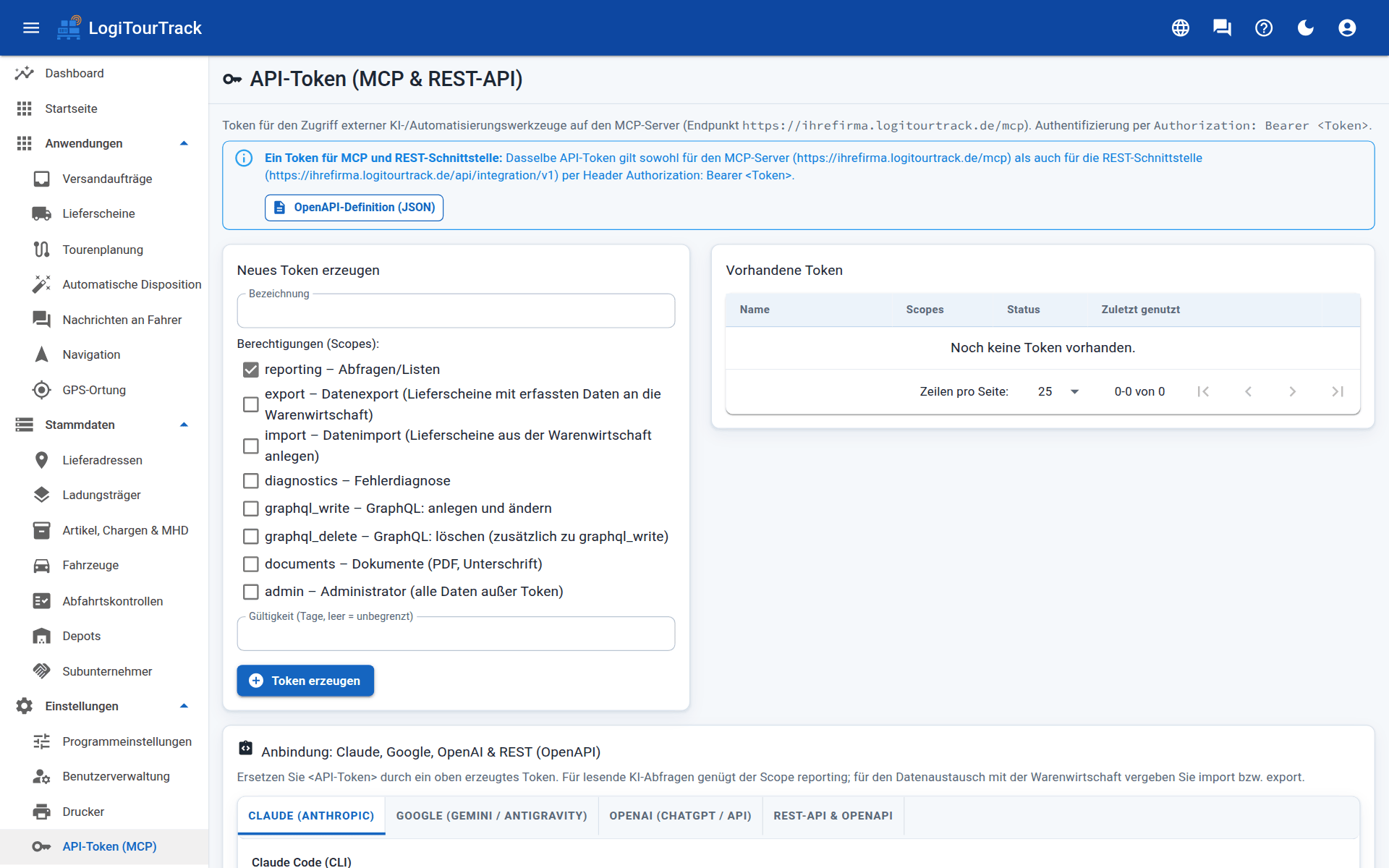
Access to REST and MCP is only possible with an API token, which an administrator creates in the instance. One token per application – this way you can block a single access without affecting the others.
- Permissions per token: read (
reporting), import (import), export (export), delivery documents and files (documents), diagnostics (diagnostics), change or delete data (graphql_write,graphql_delete), administration (admin). - Validity: limited to a number of days if required; a token can be revoked at any time.
- Visible only once: The token is displayed once when it is generated; the list shows when it was last used.
- Token for a subcontractor: sees only that subcontractor’s vehicles, tours and delivery notes and is read-only.
User permissions by area
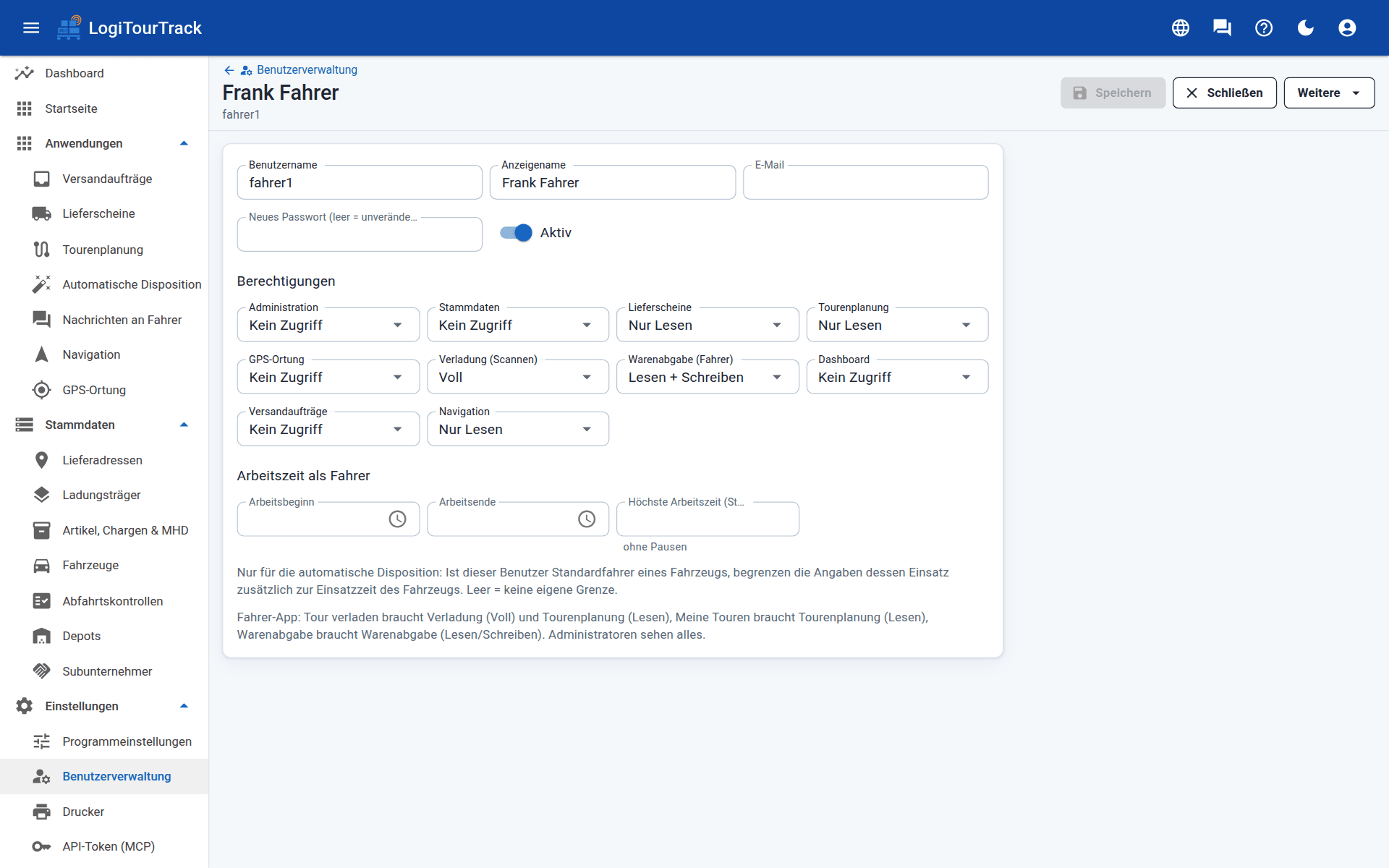
The web application and the driver app use the same users. In user management you assign a level for each area: blocked, Read, Read/Write or Full.
- Areas: administration, master data, delivery notes, shipping orders, route planning, GPS tracking, navigation, loading, goods delivery and dashboard.
- Blocked areas are invisible: Each user only sees in the menu what they have a permission for.
- Driver app: Which tiles a driver sees follows from their permissions – for example, ‘Load tour’ only with the Loading permission. The server checks the permissions on every call.
- Typical profiles: administrator, dispatch, warehouse operative for loading, driver with or without loading, management read-only.
Subcontractors and secure sign-in
- Subcontractors: If subcontractors drive on your behalf with their own vehicles, you assign vehicles and users to them. Such a user sees only the vehicles of their subcontractor, their tours and the delivery notes of those tours – read-only at most in the office, and in the driver app with loading and goods delivery as assigned.
- If a subcontractor is deactivated, its users can no longer sign in and its API tokens are no longer valid.
- Two-factor login: every login in the browser requires a code from an authenticator app or by email after the password; recovery codes are provided as well. This also applies to your customer account. The driver app still logs in with user name and password.
- Lockout after failed attempts: After several wrong passwords, sign-in for that user name is blocked for a few minutes – in the web application and in the driver app.
- Stay signed in: If you wish, the sign-in in the browser remains valid for 30 days. The password is not stored in the browser.
- Password change: A new password ends the other sign-ins in the browser and signs the user out of the driver app.
Documentation
After signing in to the customer account, you will find the detailed description of all calls, fields, webhooks and MCP tools under Docs – with the address of your instance in every example.
* Add-on module ‘Automatic dispatch’: added to the subscription in the customer account, 4,00 € per vehicle per month (net). It is included in the demo version.
Try it out
Free for 30 days, with your own address and, if you wish, with sample data.