
Delivery notes, tours and GPS tracking in one system
LogiTourTrack brings dispatch and drivers together: delivery notes with pallets and IBCs, tour planning, loading by scan, goods delivery with signature on the smartphone, and your vehicles live on the map.
- Your own address yourcompany.logitourtrack.de
- No installation
- Cancel monthly
From delivery note to signature
Everything delivery and logistics businesses need every day – in the browser for dispatch, as an app for the drivers.
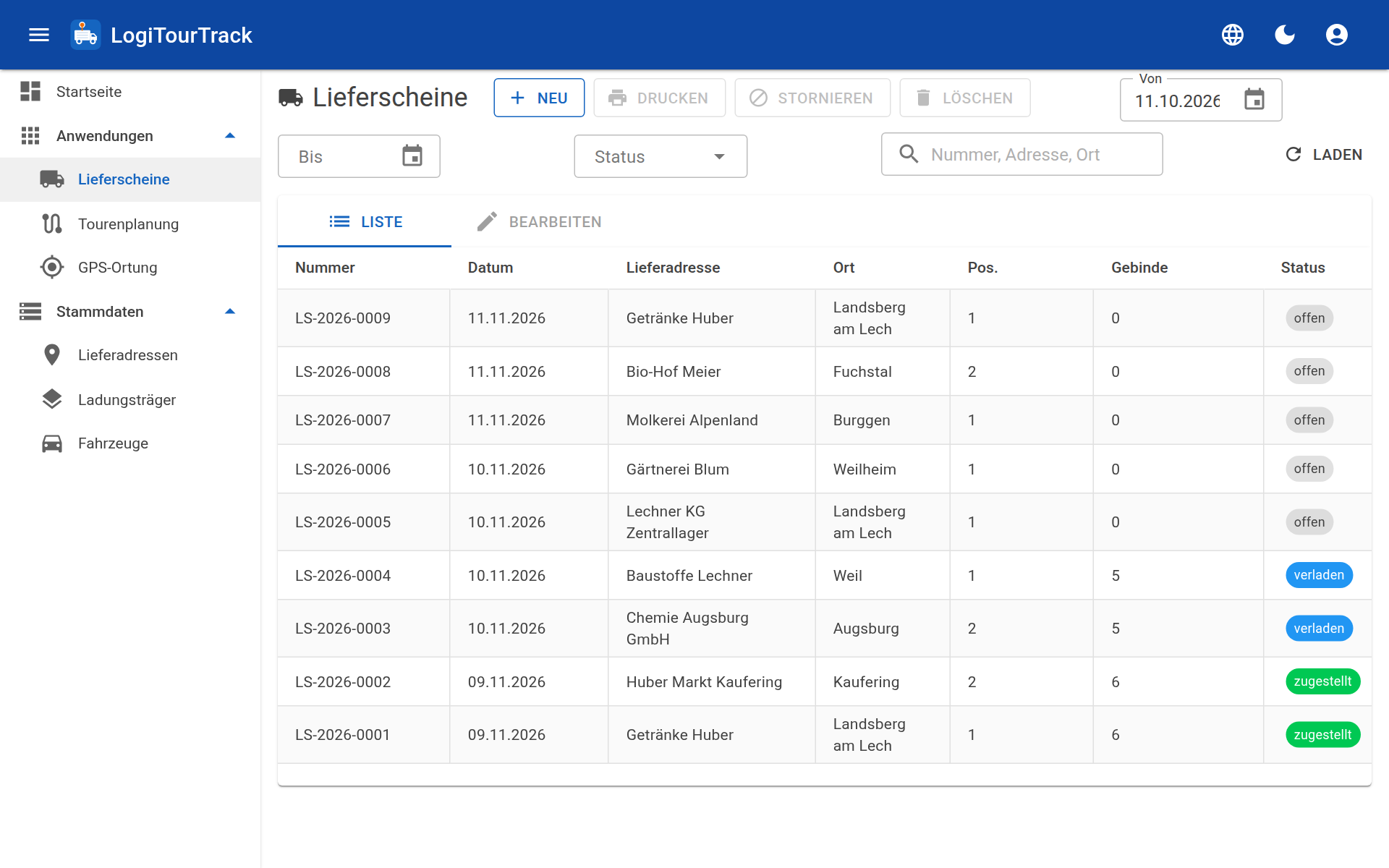
Delivery notes
- Line items, pallets, IBCs and other packages
- Load carrier exchange with stock tracking
- Delivery note and delivery documents as PDF
- Document storage for each delivery note
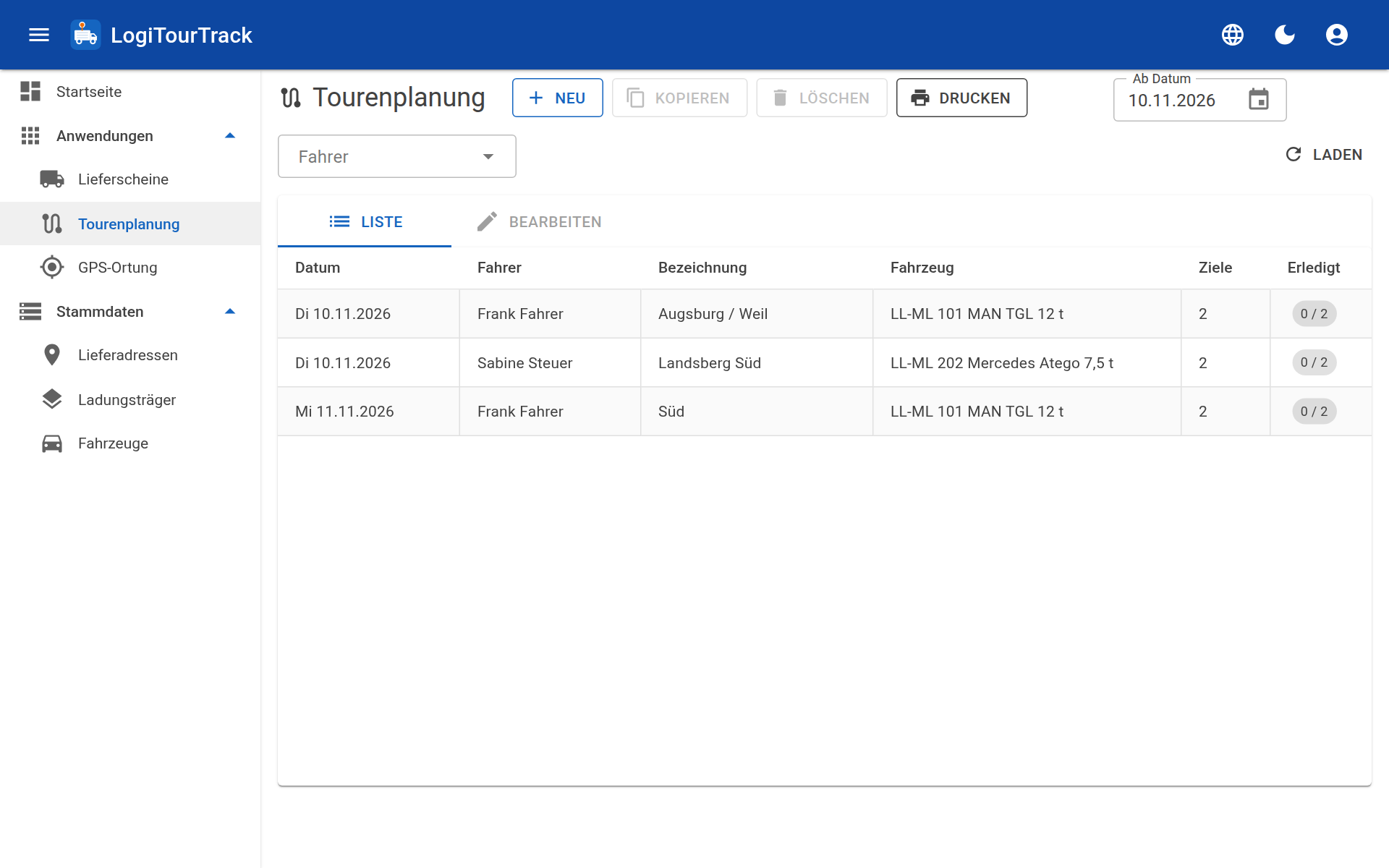
Tour planning
- Plan tours by vehicle and driver
- Tour stops with times and notes
- Loading list for loading
- The driver sees their tour in the app
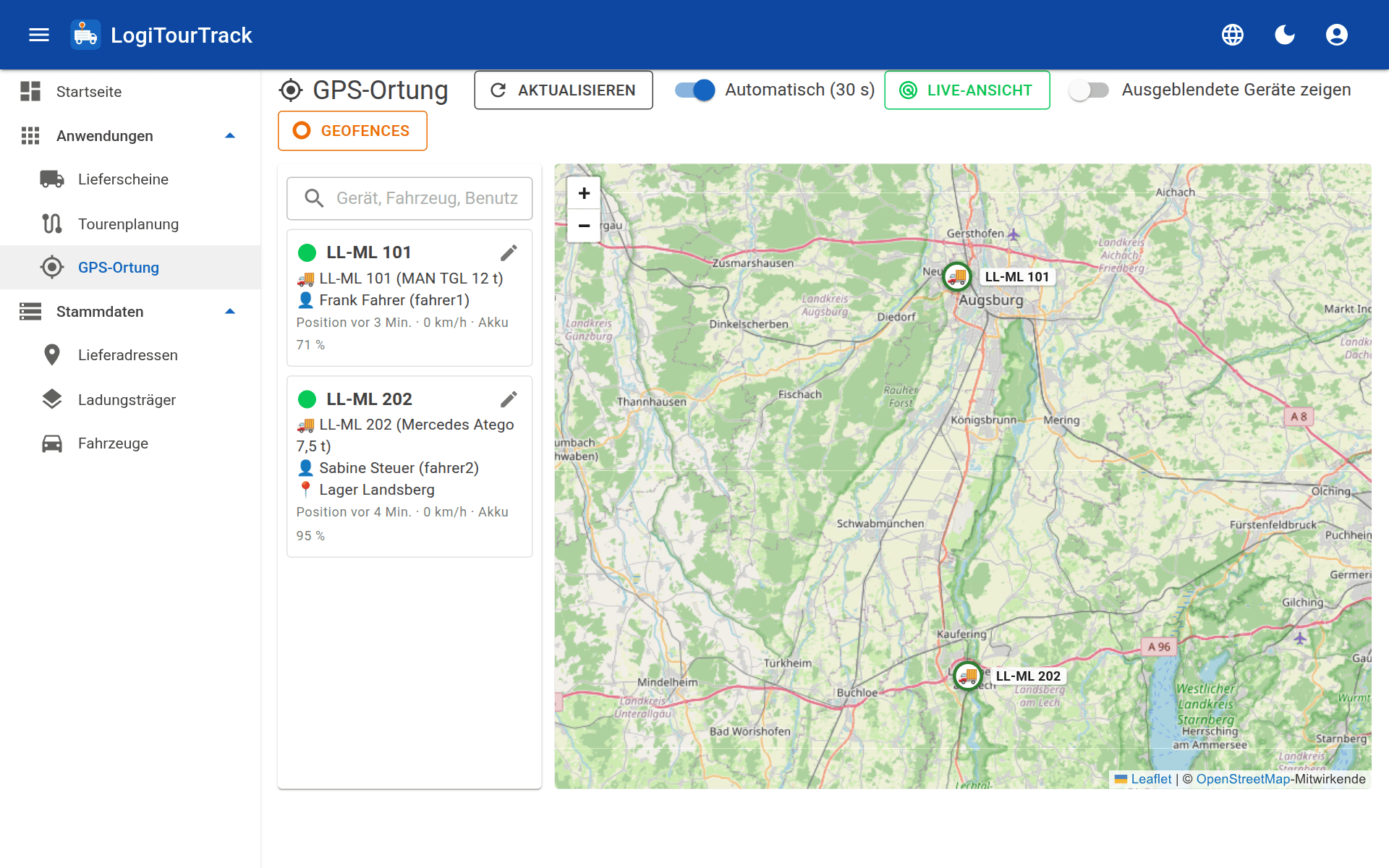
GPS tracking
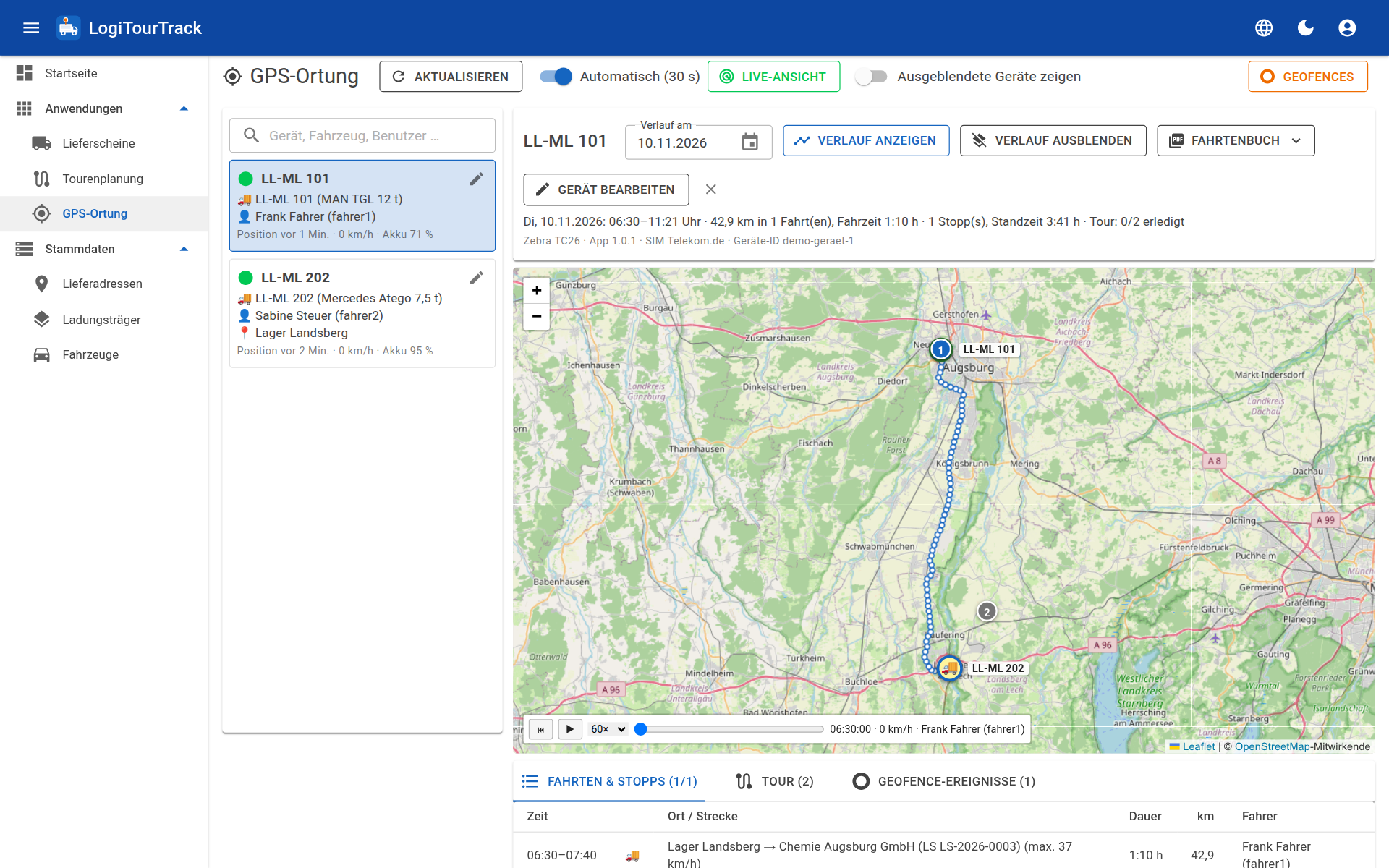
- Vehicles live on the map
- History by day and logbook as PDF
- Tracking via the driver app, with no additional device
- Can be switched on and off for each device
Loading by scan
- Scan packages during loading – with a handheld scanner or the camera
- SSCC and GS1-128 with batch, best-before date and quantity
- Target/actual comparison by load carrier type
Goods delivery at the customer’s site
- Signature and name of the recipient on the smartphone
- Record load carrier exchange at the same time
- Time and location of the delivery
- The delivery note shows as delivered in the office straight away
Integration and permissions
- REST interface (API) to your ERP system: transfer delivery notes, fetch feedback
- MCP interface for AI assistants: analyses and queries in conversation
- User permissions by area for office staff and drivers
- Interface and documents in six languages: German, English, French, Polish, Italian, Ukrainian
LogiTourTrack in one minute
From the delivery note via the tour to the signature at the customer’s site.
What LogiTourTrack looks like
Screenshots of the application with sample data.
The driver app for Android
Your drivers work with their smartphone: view the tour, navigate to the customer, load, deliver, obtain a signature. The app keeps working without a network connection and transmits as soon as there is reception again.
- My tours: the day’s tour stops with times, notes and navigation to the delivery address
- Loading: select or scan a delivery note, scan packages, compare target and actual
- Goods delivery: signatory, signature, load carrier exchange, remark and location
- Loading list and delivery note view with PDF
- Offline mode: tours and delivery notes are stored on the device in advance
- GPS tracking in the background, enabled centrally
Runs on smartphones, tablets and handhelds with a barcode scanner: Supported devices
In the cloud, at your own address
You do not need a server of your own. Every customer receives their own instance – separate from all others.
- Your own address yourcompany.logitourtrack.de
- Encrypted connection (TLS)
- Separate database for each customer
- We install the updates
- With sample data to try out, if you wish
Ready to go in three steps
Choose an account name
Your account name becomes your address: accountname.logitourtrack.de.
Try or buy
Try free for 30 days or take out the monthly subscription straight away. We set up your instance automatically.
Get started
Log in as user admin, create vehicles and drivers, connect the app.
One price, all features
You pay according to the number of your vehicles. Users, drivers and devices are not limited.
15,00 € 0,00 € base fee for the first 12 months
The base fee for cloud hosting is waived for the first 12 months, then 15,00 €/month – once per company, with the first subscription. All prices net plus VAT.
- All features, web and app
- Monthly debit, invoice by email
- Can be cancelled at any time to the end of the billing month
- Add vehicles at any time – charged pro rata
- Try free for 30 days, no payment details required
| 5 vehicles × 5,00 € | 25,00 € |
| Cloud hosting base feefor the first 12 months, then 15,00 €/month | |
| Net per month | 25,00 € |
| plus 19 % VAT | 4,75 € |
| Total per month | 29,75 € |
| From month 13 | 40,00 € net |
Cancel monthly. VAT at the German standard rate; the invoice is authoritative. The base fee is waived once per company, with the first subscription.
Frequently asked questions
What happens after the trial?
The trial ends by itself after 30 days – without cancellation and without costs. If you buy, you continue working with all the data you have entered in the same instance. If you do not buy, you can still view your data for 30 days; after that it is deleted.
Which devices do the drivers need?
An Android smartphone or tablet with a camera is sufficient. Those who load a lot use a handheld with a built-in barcode scanner or a handheld scanner. Which devices are suitable and how they are set up is described under Supported devices.
What counts as a vehicle?
Every vehicle that is kept as active in LogiTourTrack. Users, drivers and smartphones do not count.
Can I add or remove vehicles later?
Yes, in the customer account. Additional vehicles apply immediately and are charged pro rata for the current billing month. Fewer vehicles apply from the next billing month.
How do I cancel?
At any time in the customer account, to the end of the paid billing month. After that you can still view and back up your data for 30 days (e.g. delivery documents as PDF); the instance and data are then deleted. You will receive advance notice by email.
How do I pay?
Via our payment service provider Stripe, as a monthly subscription. The amount is debited monthly; the invoice is sent by email each time and is available in the customer account. If a debit fails, we will inform you; after 2 days without payment, access is blocked until the invoice has been settled.
What do I need to get started?
An up-to-date browser for the office and Android smartphones for the drivers. We set up your instance automatically after you order.
Can LogiTourTrack be connected to our ERP system?
Yes. Via the REST interface (API), your ERP system transfers delivery notes and fetches feedback such as delivery and load carrier movements. You control access yourself using API tokens with individually assigned permissions. The documentation is available in the customer account after you log in.
Can I use LogiTourTrack with an AI assistant?
Yes. Every instance has an MCP interface (Model Context Protocol). An AI assistant that supports MCP can use it with an API token to query and analyse data – only within the scope of the permissions you give the token. Setup and tools are described in the documentation in the customer account.
How do I reach support?
Via the support area: after logging in, you create a ticket there and see the history with our replies.
Who is the offer for?
For businesses. The details are set out in the Licence Terms and Terms of Use.
Try it out
Free for 30 days, with your own address and, if you wish, with sample data.